mcptools implements the Model Context
Protocol in R. There are two sides to
mcptools:
R as an MCP server:
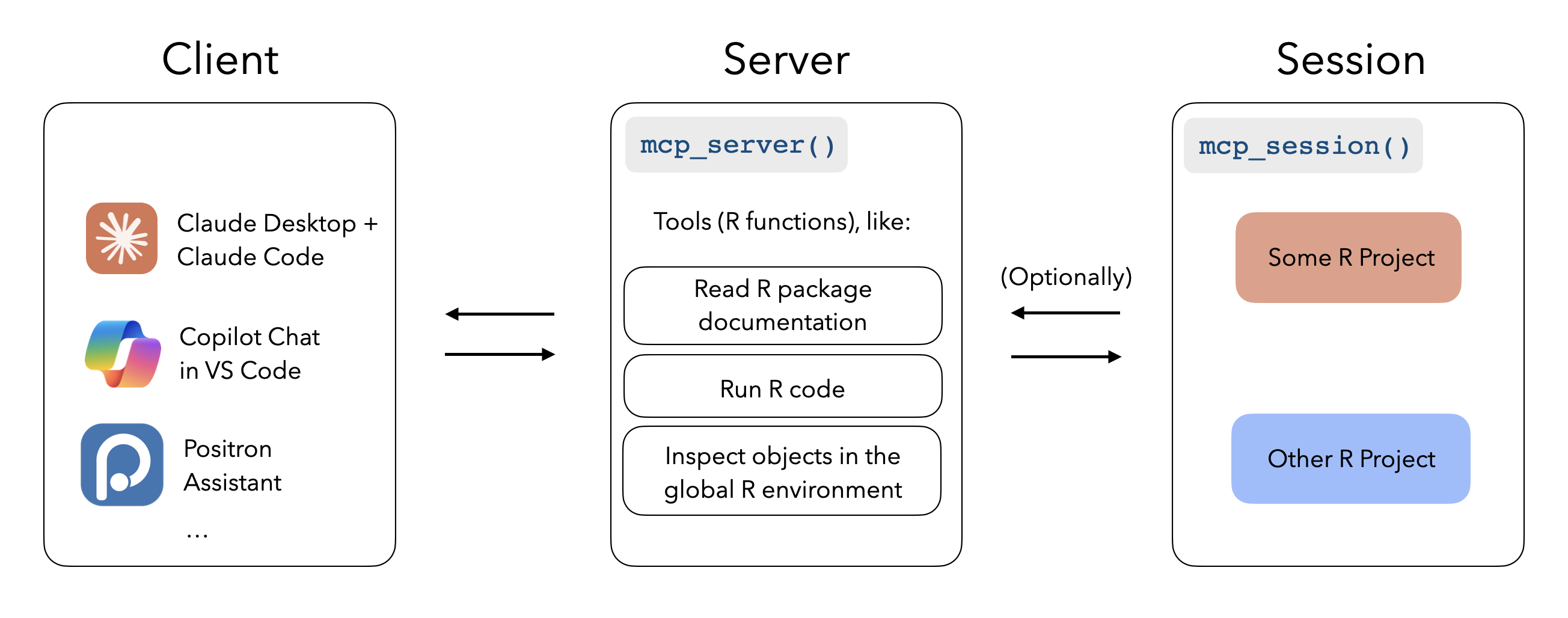
When configured with mcptools, MCP-enabled tools like Claude Desktop,
Claude Code, and VS Code GitHub Copilot can run R code in the sessions
you have running to answer your questions. While the package supports
configuring arbitrary R functions, you may be interested in the
btw package’s integrated support for
mcptools, which provides a default set of tools to to peruse the
documentation of packages you have installed, check out the objects in
your global environment, and retrieve metadata about your session and
platform.
R as an MCP client:
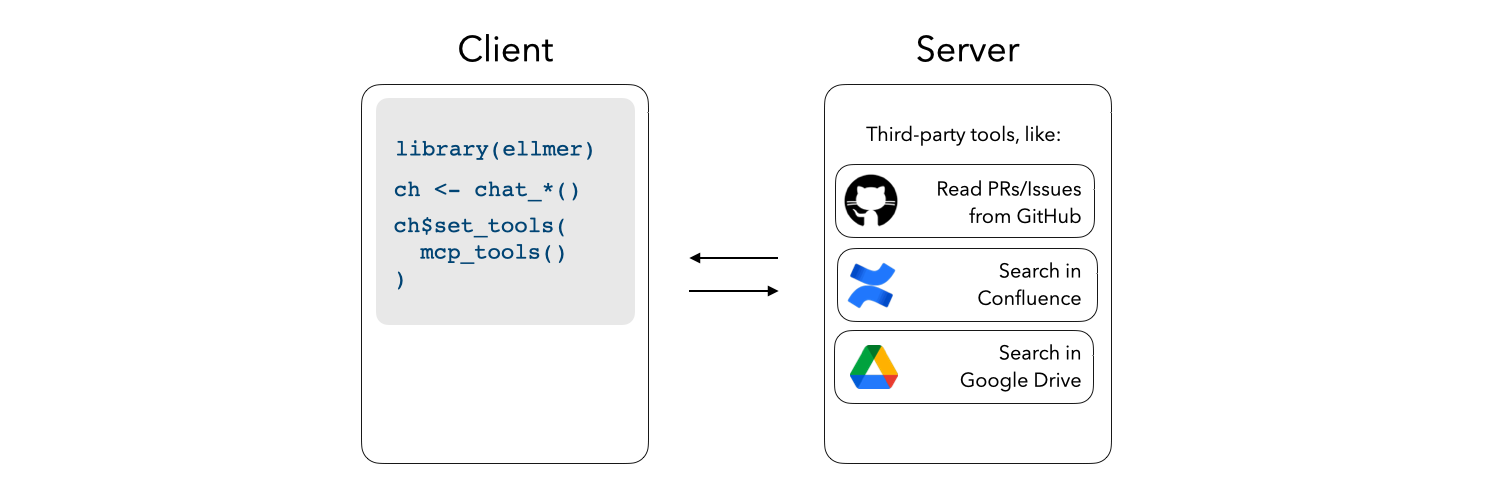
Register third-party MCP servers with
ellmer chats to integrate additional
context into e.g. shinychat
and querychat apps.
Installation
Install mcptools from CRAN with:
install.packages("mcptools")
You can install the development version of mcptools like so:
pak::pak("posit-dev/mcptools")
R as an MCP server
mcptools can be hooked up to any application that supports MCP. For
example, to use with Claude Desktop, you might paste the following in
your Claude Desktop configuration (on macOS, at
~/Library/Application Support/Claude/claude_desktop_config.json):
{
  "mcpServers": {
    "r-mcptools": {
      "command": "Rscript",
      "args": ["-e", "mcptools::mcp_server()"]
    }
  }
}
Or, to use with Claude Code, you might type in a terminal:
claude mcp add -s "user" r-mcptools -- Rscript -e "mcptools::mcp_server()"
Then, if you’d like models to access variables in specific R sessions,
call mcptools::mcp_session() in those sessions. (You might include a
call to this function in your .Rprofile, perhaps using
usethis::edit_r_profile(), to automatically register every session you
start up.)
To deploy an HTTP MCP server to Posit Connect, add a _server.yml file
with engine: mcptools and a tools file:
engine: mcptools
tools: tools.R
Deploy the directory as an R API and mark it as MCP content:
rsconnect::deployAPI(".", contentCategory = "mcp")
If the content URL is https://connect.example.com/content/abc123/, use
https://connect.example.com/content/abc123/mcp as the MCP endpoint.
If you cannot set contentCategory = "mcp" during deployment, set the
MCP category in Connect after deploying and set minimum processes to at
least 1.
R as an MCP client
mcptools uses the Claude Desktop configuration file format to register
third-party MCP servers, as most MCP servers provide setup instructions
for Claude Desktop in their documentation. For example, here’s what the
official GitHub MCP
server configuration would
look like:
{
  "mcpServers": {
    "github": {
      "command": "docker",
      "args": [
        "run",
        "-i",
        "--rm",
        "-e",
        "GITHUB_PERSONAL_ACCESS_TOKEN",
        "ghcr.io/github/github-mcp-server"
      ],
      "env": {
        "GITHUB_PERSONAL_ACCESS_TOKEN": "<YOUR_TOKEN>"
      }
    }
  }
}
Once the configuration file has been created (by default, mcptools will
look to file.path("~", ".config", "mcptools", "config.json")),
mcp_tools() will return a list of ellmer tools which you can pass
directly to the $set_tools() method from ellmer:
ch <- ellmer::chat_anthropic()
ch$set_tools(mcp_tools())

ch$chat("What issues are open on posit-dev/mcptools?")
Example
In Claude Desktop, I’ll write the following:
“From what year is the earliest recorded sample in the forested data
in my Positron session?”
Without mcptools, Claude couldn’t get far here; by default, it can’t run
R code and doesn’t have any way to “speak to” my interactive R sessions.

Using the package, the model asks to describe the data frame using a
structure that will show summary statistics from the data. mcptools will
appropriately route the request to the open Positron session, forwarding
the results back to the model for it to situate in a response.